 Bodycam Guides
Which weapon box should you open in Bodycam Zombies?
Take a standard wooden box if you need a gun now. It rolls attachments with the weapon. Open a red Loadout box when you want the primary and secondary from the preset you equipped before the match. For a dark run, prepare a preset with a weapon light and check which of the two guns has it.
Updated · Steam PC · v0.9.1
Steps
Take the plain wooden box for a quick pickup
A standard box is plain wood, and it can have question marks on the front. Use your Interact action when its prompt appears. The weapon has random attachments. Reissad says most standard-box weapons come with a flashlight, so inspect the gun or try its light before relying on it in the dark.
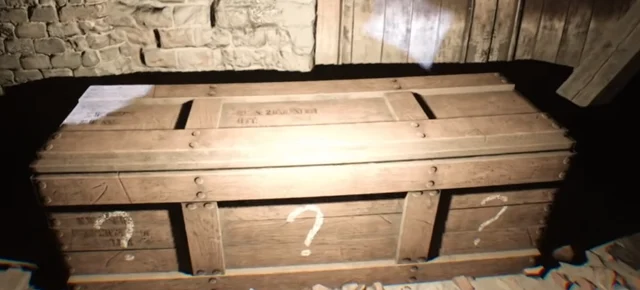
The standard weapon box is plain wood. Gameplay by RAT. Equip your two-gun preset before starting
In Loadout, select the preset you want. Keep your preferred primary and secondary in it and fit a flashlight to a compatible mount on the weapon you intend to use in dark areas. Equip that preset before launching Zombies. This sets the pair you can get from the red box.
Open the red Loadout box to get your own pair
Look for red paint on the lid and panels. Use the box prompt, then switch between your two weapons to check they match the equipped preset. If you already have a usable gun and the path to the red box is crowded, keep it and check for the red box when the approach clears.
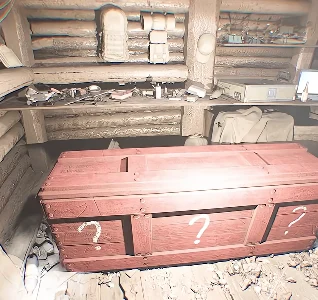
The red Loadout box draws from your equipped preset. Gameplay by FrozEddYT. Check the light on the weapon you will actually use
Aim at a nearby wall and toggle the flashlight with your assigned key. If your preset gun projects only a laser dot or line, switch to the other weapon and check for a broader beam. A safe standard box can give you another chance at a light during the run.
Zombies Weapon Flashlight →Use the map guides when you need positions
Trenches places both crate types randomly each match. The Trenches and Village red crate guides below show where to look during a run.
Completion
A standard box gives you a weapon you can inspect and use. A red box gives you the primary and secondary from your equipped preset. In a dark area, verify that the weapon you are holding can light a wall.
If you get stuck
If the red box gives you an unexpected weapon pair, check which preset is equipped before the next run. If the weapon has a flashlight but the wall stays dark, follow the binding and attachment checks in the flashlight guide.