 Bodycam Guides
How to turn on and fix a weapon flashlight in Bodycam Zombies
Open Settings and check the flashlight action in Bindings. Then verify that the weapon you are holding has a flashlight fitted. Stand near a dark wall, press your assigned flashlight key, and look for a pool of light. A laser leaves a dot or a line. A red Loadout crate gives you your equipped preset, so a preset with only a laser still leaves you without a weapon light.
Updated · The Dead & Damned v0.9–0.9.1 · Steam PC
Steps
Read the binding on your own PC
Open Settings, then the key Bindings area. Read the key assigned to the flashlight action and check the laser action separately. If flashlight is unassigned or shares a key that causes trouble, assign a spare key, apply the change, and test it when your weapon is drawn.
Check the physical attachment and test it
Check the equipped weapon’s attachments in Loadout or inspect the weapon you picked up. Point at a nearby dull wall so the flashlight’s beam has a surface to illuminate. Toggle it once, then again. A flashlight should light an area across the wall, even if your flashlight has a colored beam.
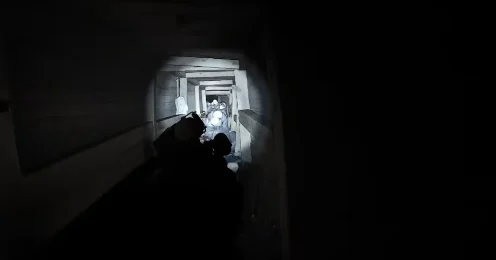
A working weapon light reveals a patch of the wall and surrounding boards. Gameplay by Rxngxrrr. Compare your box weapon with your preset
A red Loadout crate gives the weapons from your equipped preset. For the next run, fit a flashlight to a compatible mount on a weapon in that preset before creating the match. During this run, try another weapon or a plain weapon box. The standard boxes randomize attachments, and Reissad says most box weapons come with a flashlight.
Check the beam from your own view
The v0.9.1 hotfix corrected flashlight and laser toggle states sometimes appearing wrong to other players. It also corrected some visible flashlight glow artifacts. Update through Steam and use your own wall test first. Then ask a friend what they see if the issue only affects co-op.
Completion
Pressing your assigned flashlight key turns the broad beam on and off on a nearby surface while the light-equipped weapon is drawn.
If you get stuck
If there is no beam, test a second weapon you know has a flashlight. If it works, inspect the first weapon or its preset. If both fail, check and reassign the flashlight action in Bindings, then retest after applying it. If your view works and your friend sees the wrong state, make sure both clients are updated.